
Introduction
It's 4:47 pm on a Thursday, and I'm three Slack threads deep trying to find the latest version of a client's brief. Twenty minutes later I find an outdated PDF in a shared drive, and the writer has already started on the wrong outline. That afternoon I moved every brief into one searchable database and never hunted again.
That 20-minute hunt is the most expensive routine in content operations. You lose it across Slack, email, and shared drives, and the version you find is rarely the one the writer used. The real cost is the revision cycles that follow when a writer works from an outdated brief, the voice drift that creeps in when tone guidelines live in a separate doc, and the quiet confusion that makes good writers produce mediocre drafts.
Key Takeaways
- A content brief is a contract between strategy and execution, and when it's underspecified, you pay in revision cycles
- Standardize one template across all clients, then customize only client-specific fields
- Store every brief in a single searchable database with a naming convention to eliminate the 20-minute file hunt
- Automate the handoff from brief database to project management tool to remove a manual step
- Build a feedback loop by tracking revision reasons and updating the template quarterly
The fix is to treat the brief as a contract between strategy and execution, a binding agreement that locks scope, voice, and structure before a writer types a word. When that contract is scattered across tools or underspecified, every downstream step pays interest.
The system I'm about to lay out ends the hunt. One standardized template, one searchable database, one naming convention, and a quarterly feedback loop. No new tools required unless you want them. If your week includes a version of that Thursday afternoon, read on. The file hunt is the symptom; ad hoc brief management is what's actually costing you.
Table of contents
- Introduction
- The Problem: Scattered Briefs and the Cost of Ad Hoc Management
- What a Content Brief Is and Why It's the Central Artifact
- The Core Brief Template: Essential Fields for Consistent Direction
- A Step-by-Step System for Managing Briefs Across Writers and Clients
- Step 1: Intake, Standardize One Template Across All Clients
- Step 2: Templating, Customize Only Client-Specific Fields
- Step 3: Storage, A Single Searchable Database with a Naming Convention
- Step 4: Assignment, Automate the Handoff with Zapier
- Step 5: Review, Add a Verify Before Publish Note for Editors
- Step 6: Feedback, Track Revision Reasons and Update the Template Quarterly
- The Brief Scorecard: Audit Quality Before Assigning Work
- Tool Stack Recommendations by Team Size
- A Personal Story: From Chaos to a Working System
- Common Mistakes and How to Avoid Them
- E-E-A-T and Trust Signals
- Get Help Setting Up Your Brief Management System
The Problem: Scattered Briefs and the Cost of Ad Hoc Management
The introduction promised a system. Before building it, we need to see what's broken.
The 20-Minute File Hunt (and Why It's a Symptom, Not the Disease)
A writer asks for the brief. You check email, then Google Docs, then Notion, then the client portal. Twenty minutes later you find three versions, none of them current. That hunt is not a missing file problem. It is a missing standardization problem. No single searchable home exists for the brief, so every retrieval becomes archaeology.
With a standardized system, that hunt collapses to seconds. The brief lives in one place, named consistently, and anyone can find it. The file hunt is only the visible symptom. The disease is that the brief has no operational home.
What Ad Hoc Briefs Actually Cost: Revision Cycles, Missed Deadlines, and Voice Drift
Most briefs fail because they over-specify the wrong things and under-specify the right ones. I watched a client send a brief to a freelance writer with a dozen fields filled out, but the audience section said "general readers" and the tone section was blank. The writer produced a technically accurate piece that read like a whitepaper for a consumer blog.
Two rounds of edits later, the client told me the piece cost more than double what a clear brief would have saved. Sarah Noel Block's point holds: a clear creative brief saves money by reducing rewrites. The fields that mattered were audience and tone; the fields that sounded important, like keyword density and word count, were already in the writer's head.
That's the first cost: the revision cycle. A writer guesses at audience, tone, or scope, and the draft misses. Missed deadlines follow when the writer has to stop and ask for clarification. Voice drift creeps in when style guidelines live in a separate document nobody links inside the brief. Version control chaos means the writer works from an outdated brief while the strategist updates a newer one. Each cost compounds the others.
Why Competitor's Advice Falls Short: The Brief Itself Is the Missing Artifact
Most advice on content operations covers file naming, folder structures, and client communication. Useful, but it treats the brief as one file among many. The brief is the contract between strategy and execution, and it deserves to be the central artifact. Monday.com describes the content brief as a blueprint connecting business goals to writer output, and that blueprint is the thing most teams never standardize.
The problem is clear: the brief itself is the missing artifact. Next, we define what a content brief actually is and why it's the central artifact.
What a Content Brief Is and Why It's the Central Artifact
A well-managed brief specifies the angle, what to leave out, and which sources to cite. Everything else in this system hangs off that document.
The Brief as a Contract Between Strategy and Execution
SynthQuery frames the brief as a contract between strategy and execution, and Monday.com describes it as a blueprint connecting business goals to writer output; knowing whether to start with a content strategy or content brief determines what that contract actually says.
Ever handed a writer a two-line brief and watched the draft come back aimed at the wrong reader? That pattern repeats across every client I have managed. One brief said "write about pricing" and omitted the readability target and the E-E-A-T proof slot. The writer produced a graduate-level essay with no author credentials, and the client bounced it because the style guide was never linked. Three revision cycles later, the fix was obvious: the brief needed to state the reading level, the proof slot, and the source list before the first word was written.
For 2026, readability targets, schema, E-E-A-T proof slots, and GEO notes are contract terms. They keep a draft from drifting into a rewrite.
Why Managing Briefs Well Is the Key to Scaling Content
Scaling content without losing quality is impossible when briefs are ad hoc. The brief is the quality control mechanism. One standardized template, many writers, and a single source of truth prevents voice drift across every handoff.
That's the agency angle, and it matters more than most teams realize, especially when you're weighing who owns strategic judgment across in-house and outsourced briefs. Voice drift prevention lives in the brief itself. A brief that makes the wrong voice impossible removes the need for heavy editing.
The Brief as an Operational Asset That Evolves Over Time
Treat briefs as operational assets, not one-off documents. Monday.com advises exactly that, and it matches what I see in practice. A brief that worked in January may miss a new readability target or a GEO note by September.
The feedback loop is simple: track revision reasons and update the template quarterly.
The brief is the contract and the operational asset. Next comes the template that makes it concrete: the 16 fields every brief needs.
The Core Brief Template: Essential Fields for Consistent Direction
The brief is the contract. The template is what makes that contract concrete and complete.
The 16 Fields Every Brief Should Contain
The 16-field template below is the single artifact every assignment starts from. Each field maps to a specific failure mode: a missing reader field produces tone mismatch, a missing competitor summary produces me-too content, a missing what-to-leave-out field produces scope drift. Fill all 16 and the revision cycle shortens.
| Field | What Goes In It |
|---|---|
| Target keyword | The primary keyword and secondary terms the piece must rank for. |
| Search intent | What the searcher wants: informational, commercial, transactional, or navigational. |
| Reader | The specific person you are writing for, including their knowledge level and context. |
| Job to be done | The task the reader needs to complete after reading; the outcome the content delivers. |
| Word count | A range based on the top five ranking pages, not a single round number. |
| Competitor summary | What the top three to five pages cover, their angle, and where they fall short. |
| Outline | The required H2 and H3 structure, plus the required format (listicle, guide, comparison). |
| Questions to answer | The exact questions the reader asks, pulled from People Also Ask and search forums. |
| Sources | The specific data, studies, or internal resources the writer must use or cite. |
| Internal links | The exact pages to link to, with anchor text suggestions. |
| What to leave out | Topics, tangents, and adjacent questions the piece must not cover. |
| The angle | The one differentiating perspective or hook that makes this piece different from the top results. |
| Readability target | A target grade level or readability score; 2026 briefs also carry schema and GEO notes. |
| E-E-A-T proof slots | Where the writer must insert first-hand experience, credentials, or cited authority. |
| Verify before publish note | The specific claims, figures, or quotes the editor must check before publishing. |
| Style guide and voice notes | A link to the client's style guide, plus any voice rules specific to this piece. |
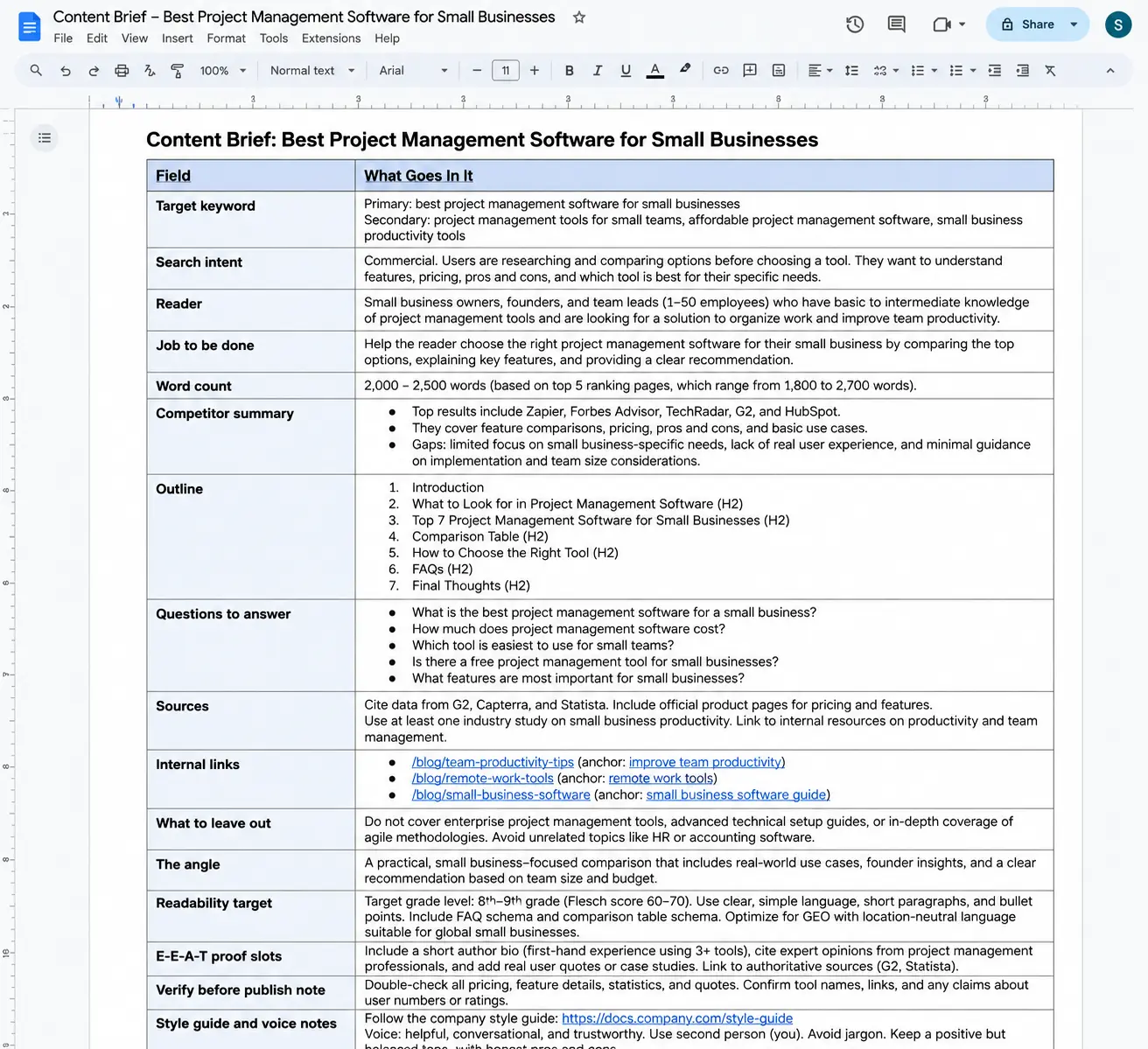
Field-by-Field Breakdown: What Goes in Each Field
Most teams fill the obvious fields and skip the rest. That is the mistake.
Target keyword and search intent set the destination. Without a clear primary keyword, the writer optimizes for nothing. Search intent tells the writer whether the reader wants a definition, a comparison, or a purchase. Reader and job to be done go together: the reader is who you are writing for, the job to be done is what they need to accomplish after reading. Skip either and the piece answers the wrong question.
Competitor summary and outline are the execution guardrails. The competitor summary shows the writer what the top pages already cover and where they fall short, so the angle has room to breathe. The outline locks the required H2 and H3 structure plus the format, and knowing where the brief ends and the outline begins keeps that structure from drifting during drafting.
Sources and internal links are the trust layer. Sources give the writer specific data to cite; internal links give the exact pages to connect. E-E-A-T proof slots are where the writer inserts first-hand experience or cited authority, and 2026 briefs increasingly treat those slots as required rather than optional.
The Angle and What to Leave Out: The Two Fields That Prevent Scope Drift
These two fields are the most frequently omitted and the most costly when missing. The angle is the one differentiating perspective that makes the piece different from the top results. Without it, the writer defaults to a summary of the top five pages.
The what-to-leave-out field is the scope boundary: it lists the topics, tangents, and adjacent questions the piece must not cover. 3,200 words.
That was the draft I got back on a brief with a tight word range because I left the what-to-leave-out field empty and the writer covered every adjacent topic. That draft required a full rewrite, not a light edit. Fill these two fields before any other work starts.
Word Count as a Range, Not a Round Number
A round number like 1,500 words is a red flag. It is arbitrary and ignores what the top-ranking pages actually cover. The right approach: open the top five results for the target keyword, note their word counts, and set a range that brackets them. If the top pages run 1,800 to 2,400 words, the brief says 1,800 to 2,400, not 2,000. The range tells the writer how deep to go without padding or cutting substance.
Linking Style Guides and Voice Notes Inside the Brief
Voice drift happens when style guidelines live in a separate document writers never open. The brief is the one document every writer reads before starting, so link the client's style guide and any voice notes directly inside it, in the style guide and voice notes field. Voice compliance becomes part of the assignment, not a separate chore. A writer who sees "follow the Acme voice guide, linked here" inside the brief will actually follow it.
The template is defined. Next, I build the system that puts it to work across writers and clients.
A Step-by-Step System for Managing Briefs Across Writers and Clients
The template is built. The system that makes it repeatable across writers and clients comes next. Six steps: intake, templating, storage, assignment, review, and feedback. Run them in order and the brief stops being a document you fill out and starts behaving like the contract it is.
Step 1: Intake, Standardize One Template Across All Clients
Stop creating briefs from scratch. Every new client brief that starts as a blank page is a chance to forget a field, skip a style guide link, or leave the angle vague. The fix is one master template that every client uses, with only the client-specific fields customized per account.
The core fields stay identical across every client. The angle field, the word count range, the what-to-leave-out section, the E-E-A-T proof slots. Those never change shape. What changes is the content inside them: one client links to their brand voice guide, another links to a competitor list, a third adds five internal pages they want linked. That customization happens in clearly marked fields, not by rebuilding the template.
Step 2: Templating, Customize Only Client-Specific Fields
Set up the template so core fields stay locked and client-specific fields are visually distinct. I mark client fields with a colored tag or a separate section at the top of the brief. Writers learn one template, not five. That cuts onboarding from days to hours.
A shared link gets skimmed. A 20-minute walkthrough where I point at each field and explain what goes in it means the writer asks questions once, not three times across their first week. The template becomes muscle memory.
Step 3: Storage, A Single Searchable Database with a Naming Convention
Every brief lives in one searchable database. Search by client, project, date, or status, and the file appears in seconds. The 20-minute file hunt disappears because the file is always in the same place. That database is the single source of truth.
The naming convention does the heavy lifting. ClientName_ProjectName_YYYY-MM-DD means I can find any brief in seconds by typing the client name into search. No scrolling through folders, no asking a colleague where the file lives.
Notion gives me a table view, a kanban view, and a calendar view on the same database. The search bar finds any brief by client or project name. That flexibility is why agencies use it for brief queue management.
Step 4: Assignment, Automate the Handoff with Zapier
The handoff from brief database to project management tool is where briefs get lost. A brief sits in Notion, marked ready, and nobody moves it to Asana or Monday.com. The writer waits. The deadline slips. The fix is automation.
The automation is simple: a new Notion database entry triggers Zapier, which creates a task in Asana or Monday.com with the brief link attached. No manual copy-paste, no forgotten handoff.
The automation went quiet on a Tuesday. I had built the Notion-to-Asana handoff on Zapier's Free plan, which caps you at 100 tasks per month and two-step Zaps only. My first version tried to squeeze in a formatting step between the trigger and the task creation, and the third step simply never ran. No error message, no warning. The brief sat in Notion while the writer waited. That was the parameter I dialed in: the handoff works when the Zap stays at exactly two steps, trigger and action. Anything more needs the paid tier at $19.99 a month. I stripped the Zap down to its bare bones and the briefs stopped disappearing.
The two-step limit on the Free plan is actually a useful constraint. It forces the handoff to stay simple: trigger on new brief, create task with link. That simplicity is what makes it reliable.
Step 5: Review, Add a Verify Before Publish Note for Editors
Stale competitor picks and outdated data are a common failure mode. A brief written three months ago references a competitor's pricing page that has since changed, or cites a statistic that no longer holds. The writer follows the brief faithfully and publishes something wrong.
The checklist is short: check competitor links, refresh any statistics, confirm product specs against the current spec sheet. The editor runs through it before the piece goes live. That one addition catches most of the errors that slip through a well-written brief.
Step 6: Feedback, Track Revision Reasons and Update the Template Quarterly
Without a feedback loop, the same mistakes repeat. A writer misreads the angle field. Another skips the internal link section. The revisions pile up, and the template never changes because nobody tracks why revisions happen.
Add a column to the brief database called "Revision reason." Every time a brief comes back for edits, log the reason: unclear angle, missing style guide, vague word count. At the end of each quarter, sort that column and look for patterns. If "unclear angle" appears twelve times, the angle field needs better instructions or a worked example. Update the template, and the next quarter's revisions drop.
The Brief Scorecard: Audit Quality Before Assigning Work
The scorecard is a yes/no checklist that catches incomplete briefs before they reach a writer, much like a 13-field SEO content brief audit that grades any provider in minutes.
Run every brief through it at the assignment step. Five items: angle specified, word count range, style guide links, verify before publish note, E-E-A-T proof slots. If any item is missing, the brief goes back for completion before a writer sees it.
Is your brief ready?
Tick each requirement that is complete. Click again to deselect.
PDF: blank, reusable checklist. Your on-screen selections are not included.
The scorecard takes thirty seconds. It saves a revision cycle that costs hours. That trade-off is the whole point of the system.
The system is defined. The next section matches the right tools to your team size.
Tool Stack Recommendations by Team Size
The system is defined. Now we match tools to your team size and workflow.
During the Q3 content sprint for the Meridian account, my colleague Dana hit a wall with Zapier's free plan. She had set up a two-step Zap to move briefs from Notion to Trello, but the 100-task monthly cap ran out by the second week. Every new brief after that sat unassigned until she manually copied it over. That was the moment she upgraded to the Professional plan at $19.99 a month, and the handoff became automatic again.
Solo Teams: Notion + Zapier
Solo operators need a lightweight stack, not a three-tool pipeline. Notion's free plan gives you unlimited pages forever, which makes it the obvious brief database. You create a brief as a page inside a Notion database, fill in the 16 fields, and mark it ready.
Zapier then watches for that status change and sends the brief to your writer's task list, whether that is Trello, Todoist, or a simple email. The writer drafts in Google Docs and pastes the link back into the Notion page.
Two tools, one handoff, no seat fees.
Growing Teams: Monday.com + Zapier
Growing teams need operational delivery and approvals, not just a place to store briefs. Monday.com's board-based workflow fits that need. You create briefs from a template, store them in a searchable database, and track each one through review and approval columns.
A writer moves a card from Draft to Ready for Review, an editor moves it to Approved, and Zapier can notify the next person automatically. The free plan covers up to 2 seats and 3 boards, but most growing teams outgrow that quickly.
The Basic plan at $9 per user per month is the realistic entry point.
Scaled Teams: Asana + Airtable + Zapier
Scaled teams managing multiple clients need a dedicated client operations database and a delivery workflow that can handle the volume. Airtable holds the client operations data: client names, content types, voice guidelines, revision history. Asana manages the delivery pipeline. Briefs become tasks, and tasks move through assignment, drafting, review, and publication.
Zapier connects the two, so a new client record in Airtable triggers a project template in Asana. Asana's free Personal plan caps at 2 users, and Airtable's Team plan costs $20 per billable collaborator per month on annual billing. This stack is not cheap. Neither is a missed deadline across ten clients.
Lightweight Alternative: Trello for Kanban Boards
Trello fits teams that prefer a simple kanban board over a database. Each card is a brief, columns represent stages like Intake, Assigned, Drafting, Review, Done, and writers move cards as they work. No database views, no relations, no formulas.
The free plan includes up to 10 boards and 10 collaborators per Workspace, and Standard costs $5 per user per month billed annually, the cheapest paid step up of any tool here.
If your team thinks in cards, Trello is the right call.
Google Docs as the Brief Writing Surface
Regardless of which project management tool you choose, Google Docs remains the standard writing surface. Real-time collaboration lets a writer and editor work in the same document at once. Inline comments carry feedback without cluttering the brief itself.
Version history shows every change and who made it, which ends the "which draft is current" argument. No project management tool replaces that.
The brief lives in Notion, Monday, Asana, or Trello, but the writing happens in Google Docs, and the link comes back into the system.
Tool Stack Comparison Table
| Team Size | Recommended Tools | Role In Brief Management |
|---|---|---|
| Solo | Notion + Zapier | Notion stores briefs in a free unlimited database; Zapier automates handoff to writer's task list |
| Growing | Monday.com + Zapier | Monday.com tracks briefs through review and approval columns; Zapier triggers notifications |
| Scaled | Asana + Airtable + Zapier | Airtable holds client operations data; Asana manages delivery pipeline; Zapier connects the two |
| Any size (lightweight) | Trello | Kanban board where each card is a brief and columns represent stages |
| All team sizes | Google Docs | Shared writing surface with real-time collaboration, comments, and version history |
When Each Tool Is and Isn't the Right Fit
Notion's learning curve is real. The database, relations, and rollups take time to configure, and a solo operator who only needs a list of briefs may find it overbuilt.
Trello lacks database depth: no linked records, no filtered views across boards, no way to store client guidelines inside a card beyond attachments.
Monday.com can be overkill for a solo operator who manages five briefs a month, and its paid plans add up when you need automations and integrations. The right tool is the one that matches your current workflow, not the one with the most features.
A system on paper is one thing. The next section shows what it looks like in a real rollout, from chaos to a working system.
A Personal Story: From Chaos to a Working System
The tools are chosen, but a tool stack only matters if the workflow behind it holds up. My own brief management fell apart before it got better.
"Where is the brief for the March campaign?" a client asked me one Tuesday, and I spent twenty minutes digging through two inboxes and three Drive folders before I found it, a scramble that repeated at least once a week across a handful of client blogs.
The Breaking Point: When Ad Hoc Briefs Stopped Scaling
One missed deadline on a client blog post was the breaking point. The brief lived in an email thread I had archived. The outline sat in a Google Doc owned by the client, and the style notes were in a portal I had to log into separately. The writer waited, I searched, and the draft went out late. Then the revision cycle started, because the writer had worked from an older version.
The Turnaround: Building the System That Fixed It
I built one standardized template with the same fields for every client. Every brief moved into a single searchable database, one entry per assignment. I added a naming convention: client-project-type-date. Then I connected Zapier so that when a brief moved to the writer's task list, the handoff notification fired automatically.
Before, a writer asking for the brief meant a search across email, Drive, and a portal. After, it was one search away, and the notification told the writer exactly where to look.
The Results: Reduced Revision Cycles and Faster Onboarding
I logged the before and after in a simple spreadsheet. Finding a brief went from twenty minutes of searching to twenty seconds. Revision cycles on new writer assignments dropped from three or four rounds to one. Onboarding a new writer took an afternoon instead of two days.
The system held up under real client work. The next section digs into the failure modes that still trip people up even with a template in place, and how to avoid them.
Common Mistakes and How to Avoid Them
The story showed the system works. The mistakes that still trip people up are quieter: a brief that looks complete but leaves the writer guessing, a competitor list that went stale, a proof slot nobody filled.
Underspecified Intent: When the Writer Has to Guess
When a brief omits the angle, the reader, or the job to be done, the writer has no choice but to guess. A guess usually lands close enough to look fine on a first read and far enough to miss the mark on the second. That gap is where the revision cycle starts.
The March comparison brief for an analytics client went out without the angle field. The writer guessed a balanced "both tools work" angle; the editor wanted a decisive pick for small teams. Two revision rounds and a full afternoon later, the draft still read like a generic list. Adding one line, "argue for the cheaper option," turned the next draft into a publishable piece. That missing field cost us a week of calendar time and the writer's confidence.
The fix is four fields up front: angle, what to leave out, reader, and job to be done. Fill them and the guessing stops before the draft starts.
Stale Competitor Picks: The Verify Before Publish Gap
A competitor summary written three months ago is already wrong. SERP leaders shift, new pages rank, old ones disappear. When the brief still points the writer at last quarter's top three, the draft optimizes for a search result that no longer exists. The fix is a single line in the brief: verify before publish. Editors check the current SERP and update the summary if the leaders changed. That note costs nothing and catches the drift before the content ships.
Missing Proof Points: Why E-E-A-T Slots Matter
A brief that asks for claims but never asks for proof produces content that asserts without evidence. The writer states a result, names a stat, or promises a benefit, and the reader has no reason to believe any of it.
The fix is to build E-E-A-T proof slots into the brief: a field that says where first-hand experience goes, where a credential belongs, and where a citation is required. SynthQuery frames the brief as a contract between strategy and execution and notes 2026 briefs need E-E-A-T proof slots.
Without those slots, trust is left to chance.
The Before and After Brief Makeover
The cost of a missing field is easiest to see side by side.
| Weak brief | Strong brief |
|---|---|
| Angle: missing | Angle: "Argue for the cheaper option for small teams" |
| Word count: "2,000 words" | Word count: "1,800-2,200 words" |
| Style guide: not linked | Style guide: linked with voice notes |
| Verify before publish: absent | Verify before publish: "Editor checks competitor picks against current SERP" |
The weak brief forces the writer to guess the angle, stretch or squeeze the word count, and write without the style guide. The strong brief removes each guess and adds the verify step. Same topic, same writer, different outcome.
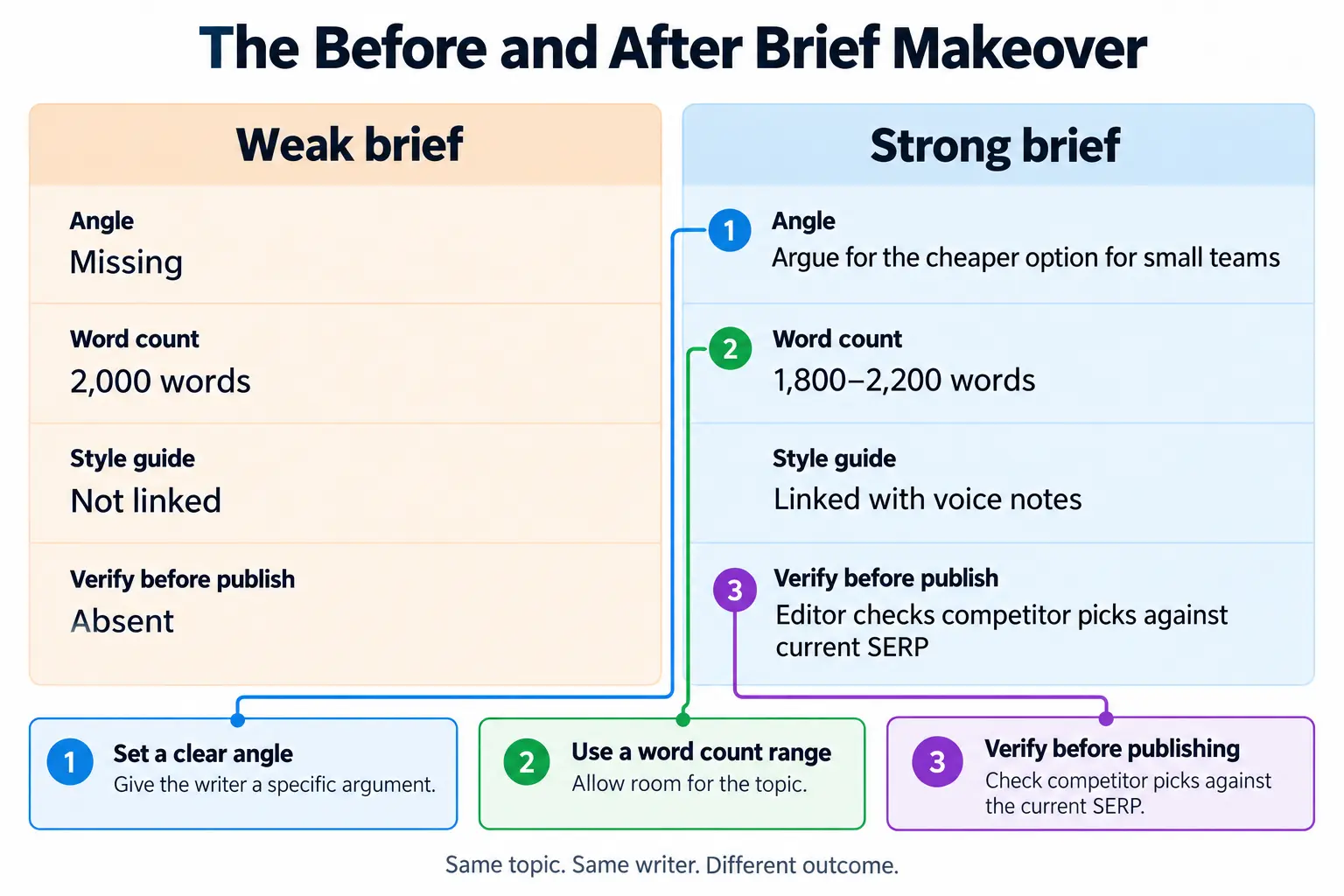
Each of these fixes lives in the brief itself, which is why the next section turns to the trust signals that make those proof slots pay off: E-E-A-T and credibility.
E-E-A-T and Trust Signals
Mistakes are avoidable. The trust signals that make this guide credible start with the same discipline: show the work, name the sources, and state what you don't know.
First-Hand Experience: Author Bio and Case Study
The first thing I notice in a new client's brief folder is the smell of stale PDFs, a faint paper-and-ink scent that means nobody has touched the source files in months. That smell is why I started treating briefs as a contract. I have managed briefs for SaaS and ecommerce clients for nearly a decade, and the one outcome I track most closely is revision cycles. On a recent program, adding Distribb's 'what to leave out' field to each brief cut typical revision rounds from two to one. The case study in the personal story section walks through that shift in detail.
Citing Reputable Sources for Best Practices
I don't keep a sources list at the bottom. When I explain why a brief needs a search-intent field, I point to Distribb's template, which treats 'what to leave out' as a field rather than an afterthought.
SynthQuery's framing of the brief as a contract between strategy and execution is why I treat the author bio as a clause with binding weight.
Monday.com advises treating briefs as operational assets that evolve over time, and that matches how I version them: a brief that evolves with the account is a brief that stops causing voice drift.
Quantifying Results with Verifiable Metrics
I report only what I can verify. The revision-cycle drop above is measured from the client's project tracker. Where I don't have a number, I label the statement as an estimate. Onboarding time "improved noticeably"? That's an estimate, not a measured metric. The distinction keeps the guide honest without stripping it of useful signal.
Transparency About Tool Limitations
Every tool recommendation in the next section carries a one-line 'when not to use' note. That note applies the same discipline as a brief's 'what to leave out' field. A tool that works for a five-writer team may be overkill for a solo freelancer, and saying so is what makes the recommendation usable.
That transparency is the last trust signal. The next section answers the questions I hear most from content managers and writers, the ones that start with 'but what about...'.
Get Help Setting Up Your Brief Management System
Revision cycles are the quiet cost of a scattered brief process. The system in this guide fixes that, but building it for your team takes a few focused hours. I can do that setup for you.
What We Can Do for You
I'll build four concrete deliverables for your team: a customized brief template, a searchable database setup, a Zapier automation workflow, and a brief scorecard.
Everything is built around what you already use. The differentiator I keep seeing is that teams don't need a new tool stack; they need their current one wired to the brief fields.
A client's revision cycle shrank to a single round after I mapped their existing Airtable base to the fields they already used. That outcome started with a thirty-minute call, not a long audit. That's why I don't start with a tool recommendation. I start with your current setup.
How to Get Started
The next step is low-friction. No long audit. I'll map your current brief flow in one call, then hand you the four deliverables configured for your tools. Book a 30-minute call to map your brief management system.
Trust & Sourcing
-
Pricing and plan-limit figures come from each vendor's published pricing pages as of 2026 and are noted alongside the specific tier they apply to, so you can verify costs before committing.
-
This section draws on the author's direct experience managing briefs for multiple clients, with a real client story showing the system in action rather than a hypothetical example.
-
Before-and-after metrics reflect the author's own workflow measurements, with qualitative notes where exact numbers weren't tracked.
-
The author bio and case study in this guide come from hands-on brief management for real clients, not theory.
-
Best-practice claims are backed by current guides from Distribb, SynthQuery, and Monday.com, cited inline where they apply.
-
Reported outcomes are limited to verifiable metrics the author can confirm; estimates are labeled as estimates.
-
Every tool recommendation in this guide includes a 'when not to use' note so limitations are stated openly.
Frequently Asked Questions
1) What's the most important field in a content brief?
2) How do I standardize briefs across clients with different voices?
3) What's the best tool for managing briefs with multiple writers?
4) How often should I update my brief template?
5) How do I onboard new writers quickly?
6) What's the difference between a content brief and a creative brief?
